The PlayBook’s useless keyboard language button

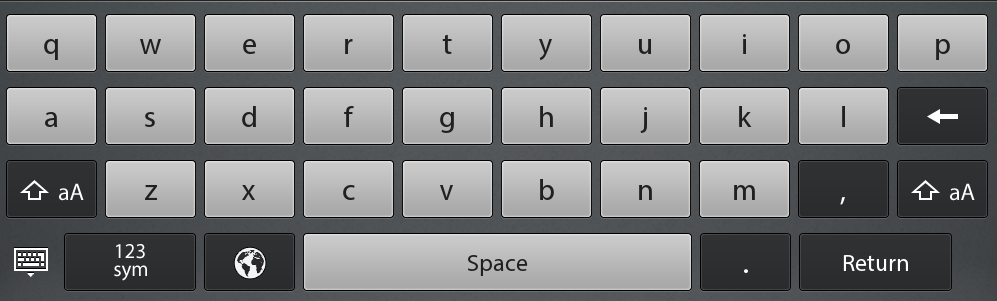
Above is the default keyboard layout for the BlackBerry PlayBook. For the most part it is your standard keyboard. But it has one button that instead of a letter, is a picture of the planet. This button is completely useless.

Technically this button can be used in order to change the keyboard’s language, but nobody every uses it. Instead of this waste I would like to see something useful on this part of the keyboard. Something like @ or $ or ‘ or ” or & or anything else. Screen real estate is already at a premium with a full two pages already being used for additional symbols. Is it really too much to ask to get something useful promoted to the default keyboard?

Changing the language is something that is never done by most users, and is done rarely by those that do need to do so. The option to change the keyboard language should be on either the existing Language options page or the existing Keyboard options page (or both). It should not, however be on the keyboard itself, when something useful could take its place.

6 thoughts on “The PlayBook’s useless keyboard language button”

  1. I have to disagree. Every bilingual user will find this button extremely useful. Sometimes I even need to switch the language several times in a single sentence (for example when I write something in my native language but need to add technical words /English, German/). Probably RIM could release two OS versions – one multilingual and one English only, removing the language button from the English only.

    1. While the people who write in multiple languages frequently will find this a useful button, the number of people (as a percentage of users) who that applies to is going to be pretty low. Those uses could be accommodated by having an alternative multilingual keyboard layout (maybe meaning only the return of this button).

      Seems like there are many other characters that would be used much more frequently but a massive % of all users for which that button space could be better leveraged.

  2. I disagree! I flip between languages quite often and is a very useful button. 
    Ca va bien!

    1. That is true, but who switches between 20 languages? Parallel to that, many languages are still not supported! So, better would be to configure the keyboard for quick switching between 2-3 languages, and at the same time – to provide more different keyboard layouts!

  3. Well, I just spent an hour on t’internet trying to figure out why my keyboard was all screwed up and spell-check muddled. Had I not spotted this page I wouldn’t have known how to change it back… Still not sure how it changed in the first place!

Comments are closed.